Add a database
Declare a database next to your application. Choose its engine, version, and protection tier; deliberate. provisions it, generates its credentials, expands its storage, monitors it, and applies the backup policy for that tier.
resource: databasename: postgresengine: postgrestier: prodversion: "17"Connect it to a Component without copying a password into YAML:
env: DATABASE_URL: "${{ postgres.url }}"needs: databases: - postgresWhat is included
Section titled “What is included”PostgreSQL and FerretDB share the same PostgreSQL storage and durability machinery. For both engines, the platform automates:
- provisioning and reconciling the database cluster;
- encrypted durable storage and automatic storage expansion;
- generated application credentials and stable connection outputs;
- memory-derived tuning of the PostgreSQL runtime;
- health supervision, logs, metrics, alerts, and runtime reconciliation;
- encrypted backup chains and point-in-time recovery for protected tiers;
- routine restore drills for protected databases; and
- replica placement and automatic failover on the
hatier.
Changing the declaration reconciles the existing service. Moving between tiers or compute sizes does not require your application to adopt a new connection string.
Choose PostgreSQL or FerretDB
Section titled “Choose PostgreSQL or FerretDB”The shared operational foundation does not make the two engines feature-identical.
PostgreSQL exposes the PostgreSQL wire protocol, direct and pooled connection
outputs, allow-listed extensions, one-time initSQL, and bounded additional
login roles.
FerretDB exposes a MongoDB-compatible wire protocol through a stateless proxy.
Its version selects a tested FerretDB and DocumentDB release pair; the backing
PostgreSQL major is selected by that release. FerretDB initializes its own
DocumentDB extensions and roles, so customer-authored PostgreSQL extensions,
initSQL, and additional roles are not accepted. It exposes a MongoDB URL,
not PostgreSQL’s pooled connection output.
FerretDB implements the MongoDB protocol but is not MongoDB itself. Application compatibility depends on the MongoDB operations used by the application and should be tested in a disposable Environment before production use.
Choose a protection tier
Section titled “Choose a protection tier”| Tier | Runtime shape | Data protection | Intended use |
|---|---|---|---|
dev | One database instance on durable storage | No archive backup chain | Disposable development and previews |
prod | One database instance on durable storage | Continuous WAL archiving, daily base backups, point-in-time recovery, and restore verification | Production data that needs platform recovery points |
ha | Three database instances spread across failure domains | The prod recovery posture plus automatic replica failover | Production data that also needs runtime redundancy |
prod and ha retain at least two completed base backups and prune scheduled
backups after seven days. PostgreSQL writes WAL continuously between base
backups, making recovery to a point inside the retained chain possible. The
platform periodically restores protected databases into isolated verification
clusters and records whether the recovered database became healthy and readable.
These are platform policies rather than a collection of backup knobs. You can request an additional backup or a restore when an operational event requires one; the platform runs the normal schedule, retention, encryption, and technical verification automatically.
Recover or copy a database
Section titled “Recover or copy a database”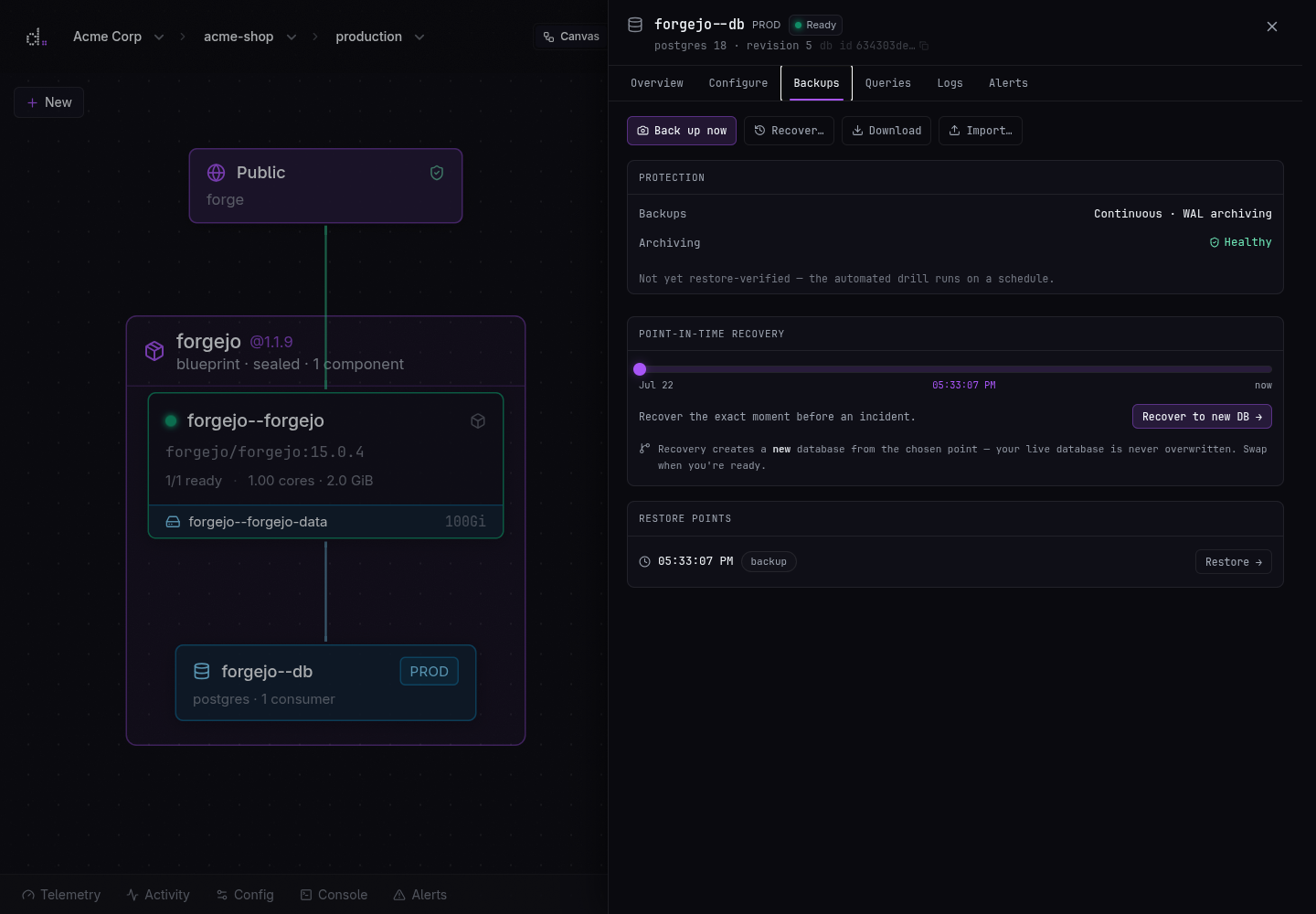
Database recovery does not overwrite the only running copy first. Restore and rewind operations build a separate database from the selected recovery point and wait for PostgreSQL to become healthy. Your team can then validate the recovered application state before choosing to use it.
When an Environment is derived from another Environment, deliberate. can also seed its database from the upstream data. This makes it practical to test an application or Blueprint change against realistic state without sharing the production database with the preview.
Understand restore verification
Section titled “Understand restore verification”A successful restore drill proves that the platform could retrieve and decrypt the selected backup chain, replay its WAL, start PostgreSQL, and read the recovered database. It does not prove that the selected point contains the business records your team expected or that your application behaves correctly against that state.
Recovery is limited to recovery points that exist inside the configured retention window. Platform backups are one recovery layer, not a substitute for your organization’s continuity, retention, or compliance policy.
Plan for application-level recovery
Section titled “Plan for application-level recovery”Your team owns the application-level meaning of its data: schema migrations, query design, application authorization, selecting and validating a recovery point, retention required by your business or regulators, and deciding when an independent export must be kept outside the platform’s standard retention window.
For critical changes, create a disposable Environment, apply the change there, and exercise the application before changing production.